Creating OKRs and Initiatives in Rhythms
Last updated: March 2, 2026
Why You'd Create OKRs
You create OKRs at key moments: planning a new quarter, launching a strategic initiative, forming a new team, or responding to shifting priorities. The goal is always the same: translate strategy into measurable outcomes and concrete work.
Rhythms gives you three ways to create OKRs, each suited to different situations:
Conversational creation with Rhythms chat (recommended): Have a natural conversation to develop and refine your OKRs
Form-based creation with AI assist: Use traditional forms enhanced with smart suggestions
Document-based generation: Upload strategy documents to generate complete OKR sets
For a complete understanding of the OKR framework and best practices, see Introduction to OKRs.
Getting Started
All creation paths begin from your Rhythms home screen. Click "New Objective" in the top right corner. You'll see two options:
"Explore with Rhythms": Opens chat for conversational creation (can include document upload)
"Write Myself": Opens the form-based interface with AI assistance
Rhythms chat is also always available through the sidebar, so you can start a conversation about creating OKRs from anywhere in the platform.
Method 1: Conversational Creation with Rhythms Chat
Chat is the simplest way to create OKRs in Rhythms. Instead of filling out forms, you have a natural conversation where Rhythms helps you think through strategy and suggests well-structured OKRs.
Starting the Conversation
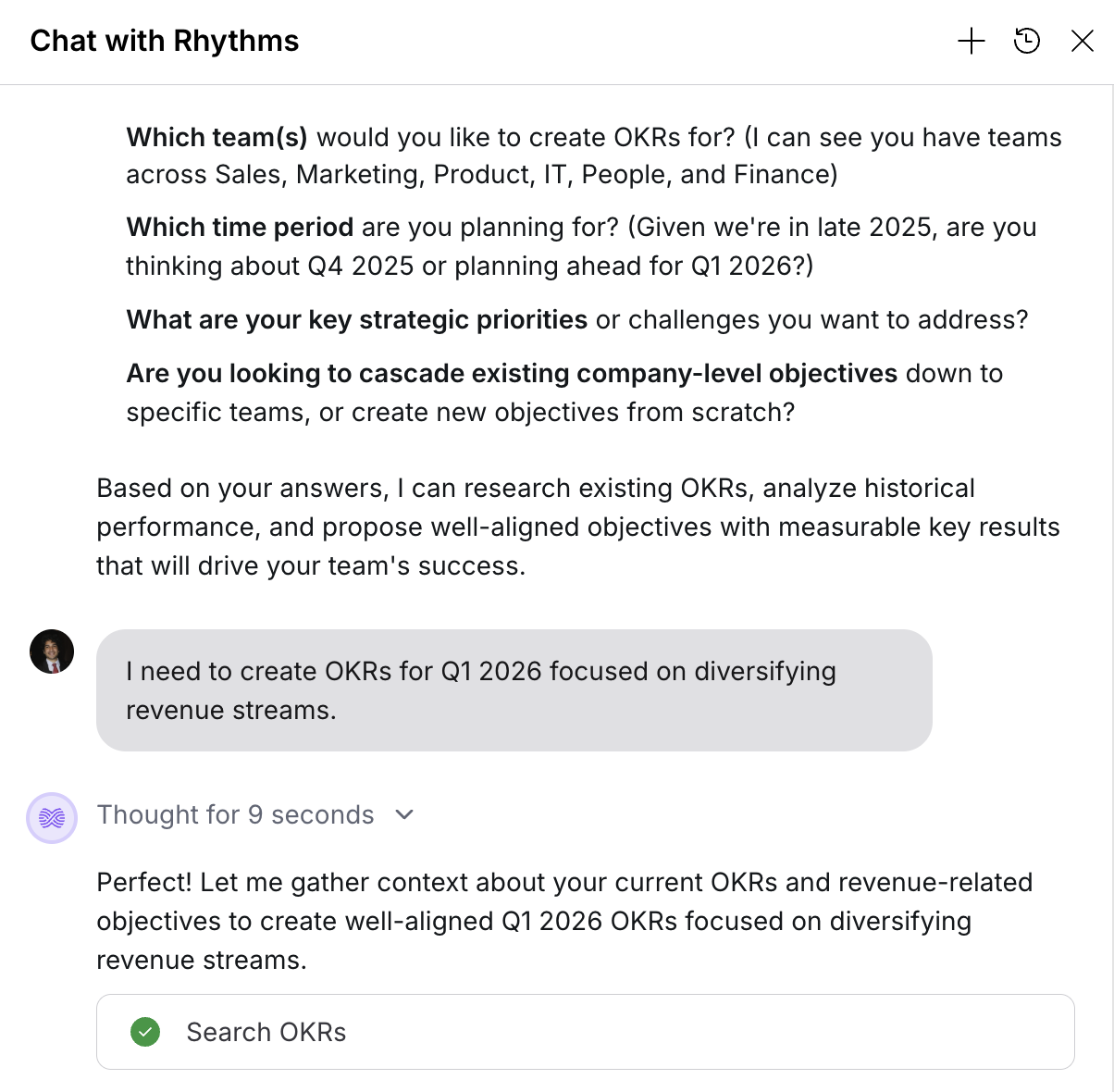
Begin by telling Rhythms what you need:
"I need to create Q1 2025 OKRs for the Engineering team"
"Help me set objectives for our customer success initiative"
"I want to create OKRs based on our strategic plan"
From the creation flow: Click "New Objective" → "Explore with Rhythms"
From anywhere: Use the chat sidebar to start the conversation
How Chat Works With You
Once you start, Rhythms gathers context to help you create effective OKRs:
Automatic context detection: Chat recognizes which team view you're in, what time period you're planning for, and what existing OKRs are relevant.
Clarifying questions: Rhythms asks about scope, priorities, and focus areas to understand what you're trying to achieve.
Strategy document analysis (optional): You can upload planning documents, and Rhythms will analyze them alongside your organizational context and past OKR performance.
AI-powered suggestions: Based on everything it knows about your organization, Rhythms proposes complete OKRs that follow best practices (significant Objectives, measurable Key Results, resourced Initiatives).
Iterating With Chat
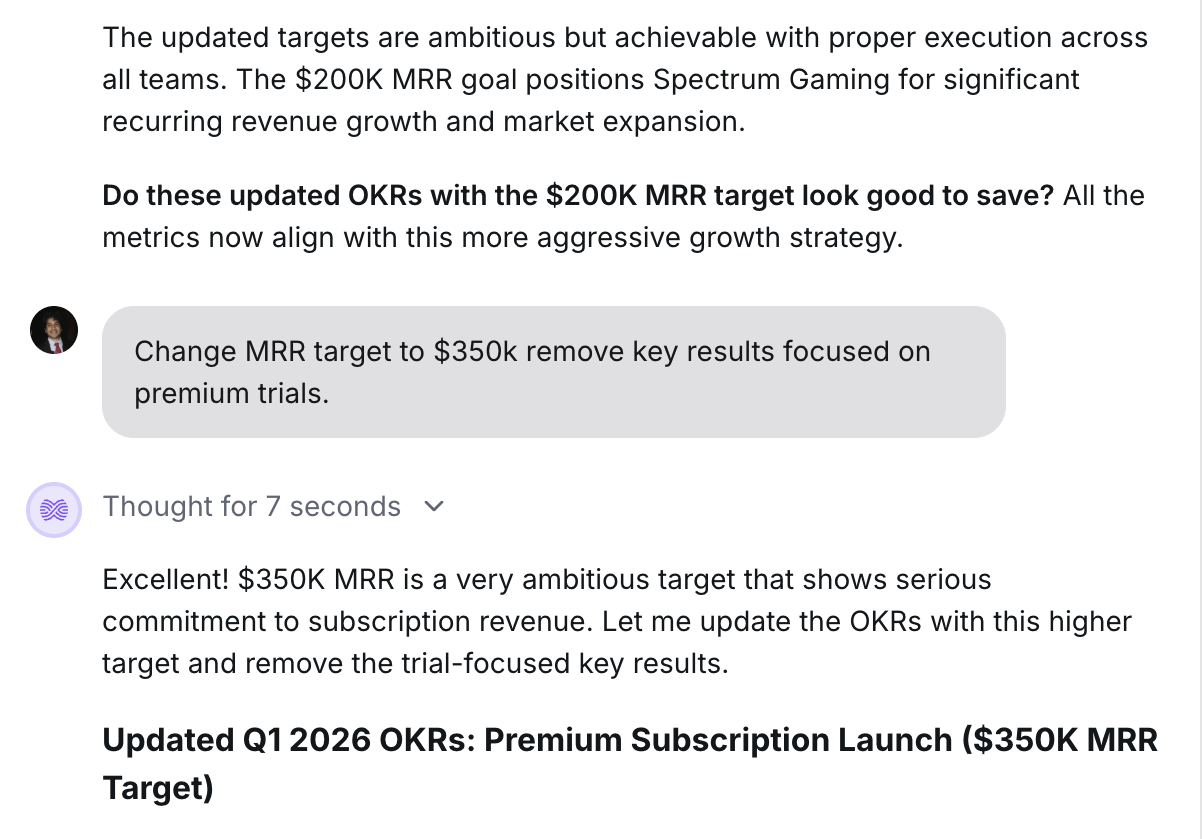
The power of conversational creation is refinement through dialogue. You can:
Modify values and details:
"Make the revenue target $1.8M instead of $1.5M"
"Change the owner to Sarah"
"Move the timeline to Q2"
Add or remove components:
"Add an Objective about improving team productivity"
"Remove the Initiative about conferences"
"We need one more Key Result to measure quality"
Get guidance and explanations:
"Why did you suggest that metric?"
"Should this be an Objective or an Initiative?"
"How does this align with our company goals?"
Explore alternatives:
"Can you suggest different Key Results for this Objective?"
"What if we focused on retention instead of acquisition?"
"Brainstorm other ways to measure Customer Success"
Go through as many rounds of refinement as needed. Chat remembers the full conversation, so you can build incrementally.
Review and Approve
When your OKRs look right, chat presents them as drafts:
Here are draft OKRs for Engineering Q1 2025:


Objective 1: Achieve platform reliability at enterprise scale

  KR1: Maintain 99.9% uptime across all services

  KR2: Reduce API response time from 200ms to 100ms

  Initiative 1: Implement Redis caching layer by February

  Initiative 2: Optimize top 10 database queries by March


Would you like me to save these for review?
To approve: Say "Yes, save them" or "Looks good, create them" or simply "Proceed"
To modify: Continue the conversation with changes
Final Review and Publish
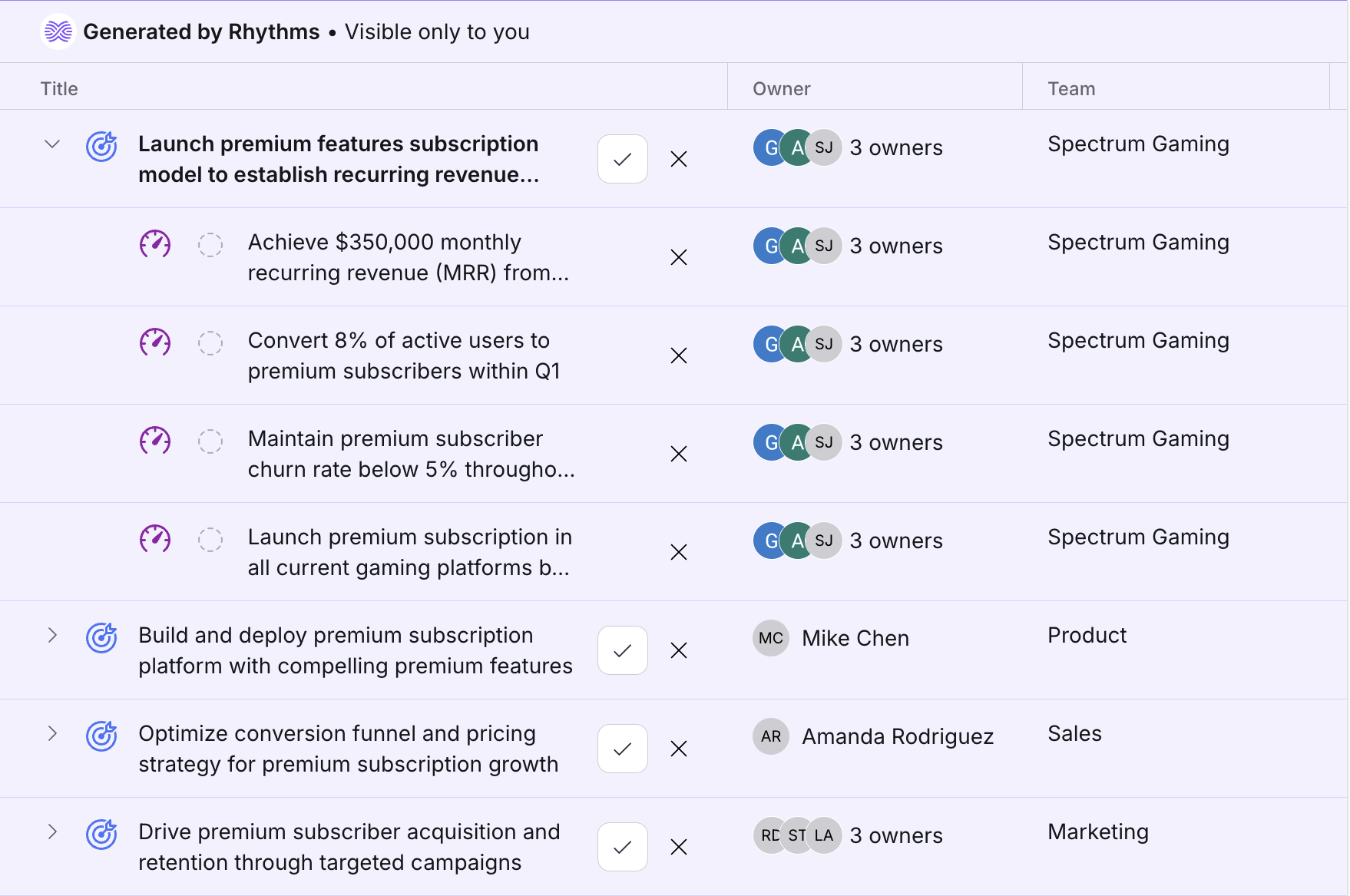
Approved drafts appear in the Rhythms UI for final review. From there, you can:
Review all details (owners, teams, time periods, alignment)
Make any final adjustments in the UI
Publish the OKRs to make them visible across your organization
Important: Drafts created in chat aren't searchable until published. They exist only for your review.
Adding to Existing OKRs
Chat can also add components to OKRs you've already created:
"Add 3 initiatives under the 'Improve Customer Satisfaction' objective"
Rhythms will:
Find the Objective (may show multiple matches if the name isn't unique)
Suggest relevant Initiatives based on the Objective and its Key Results
Wait for your approval before creating them
Method 2: Form-Based Creation with AI Assist
If you prefer traditional forms or want more direct control, use the form-based interface enhanced with AI suggestions.
Accessing the Form
Click "New Objective" → "Write Myself"
Creating Objectives
Enter your Objective title in the main field.
Use AI assistance:
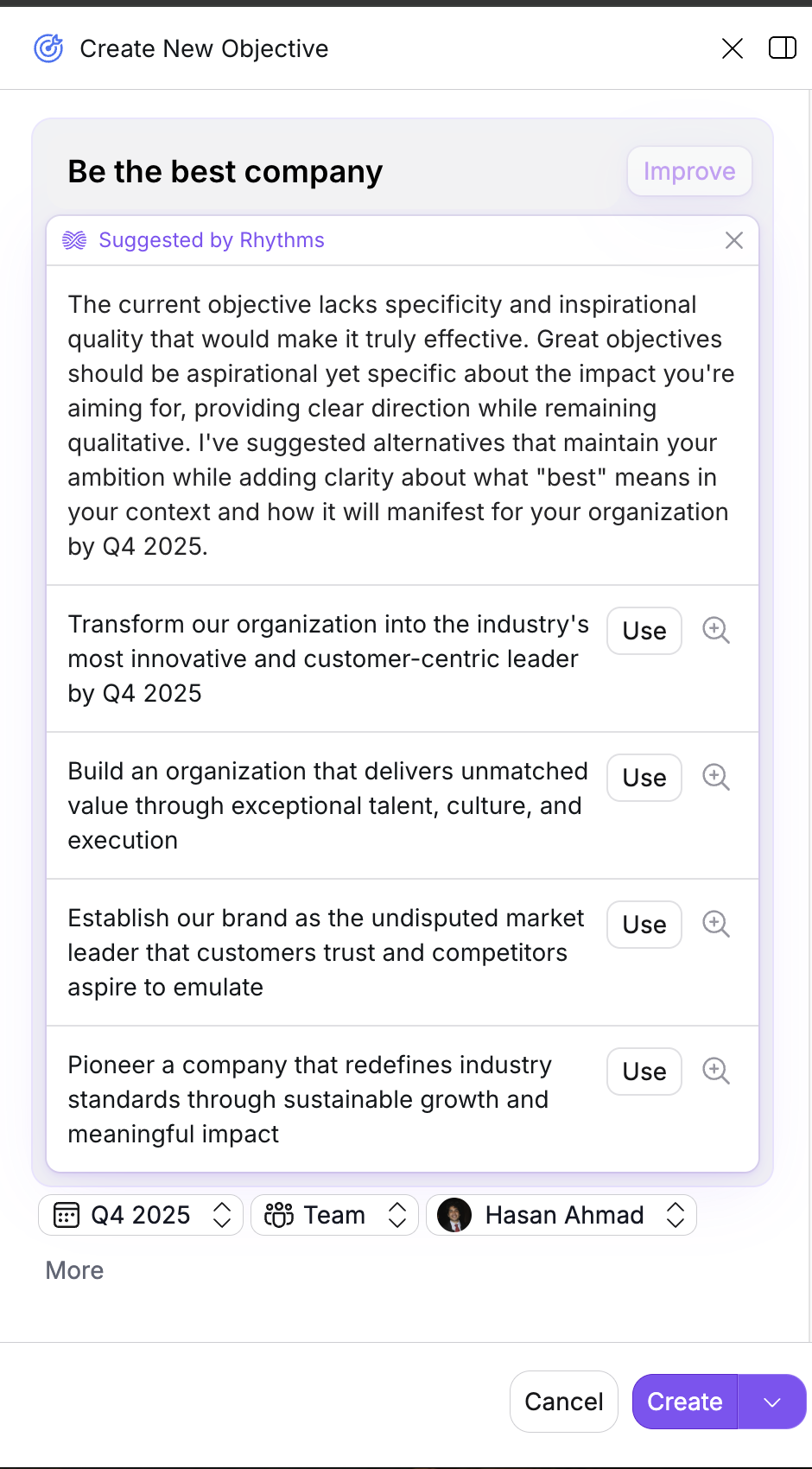
Click "Suggest" to get AI recommendations based on your organizational context, current team, and time period
Type your own Objective and click "Improve" to refine it using OKR best practices
Set metadata:
Time period: Choose the quarter or custom time period
Team: Select which team owns this Objective
Owner: Assign an owner (defaults to team owner for team OKRs)
Description: Add optional context or notes
Configure alignment:
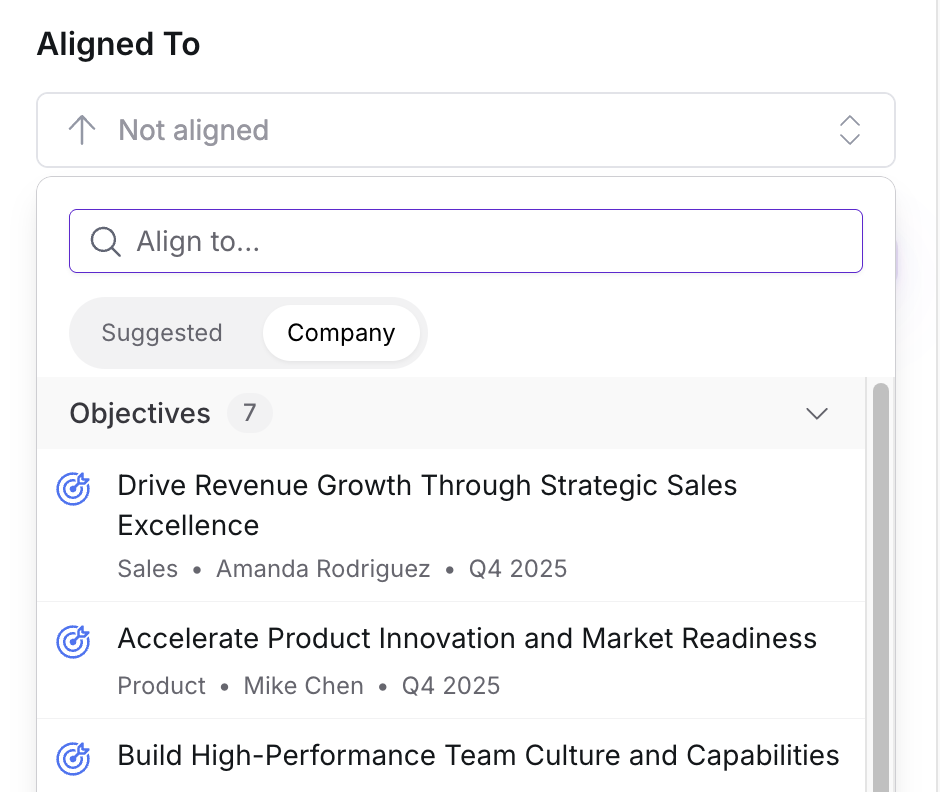
Click the "Aligned To" dropdown to see AI recommendations for parent Objectives
Or use "Align to..." search to find a specific parent Objective
Rhythms allows flexible alignment (Objectives to Objectives, Objectives to Key Results if your model supports it)
Get suggested Key Results: After filling in Objective details, Rhythms can suggest Key Results that measure success. You can accept these suggestions or write your own.
Choose next action:
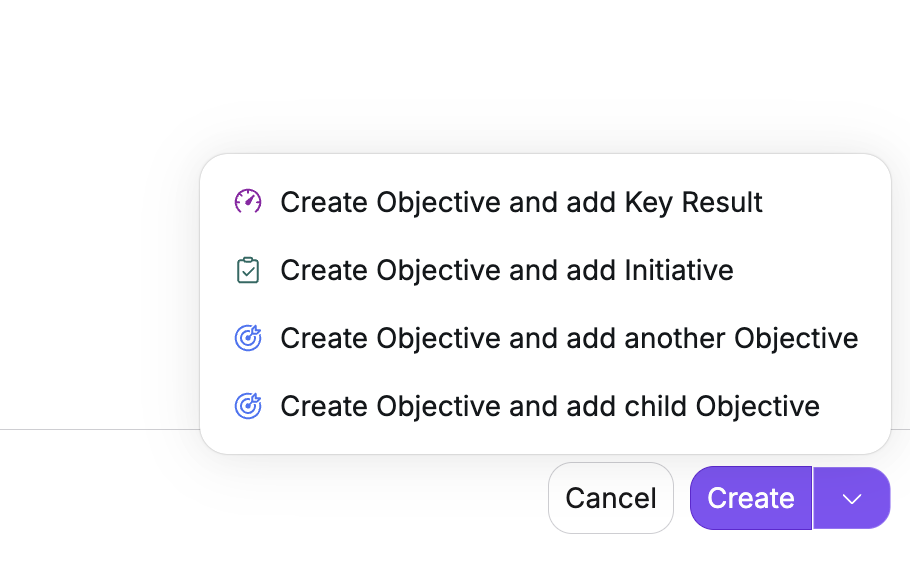
Create: Publishes this Objective
Add another Objective: Continue creating more at the same level
Add Child Objective: Create a child Objective beneath this one
Add Key Result: Add Key Results to this Objective
Add Initiative: Add Initiatives to this Objective
Adding Key Results to Existing Objectives
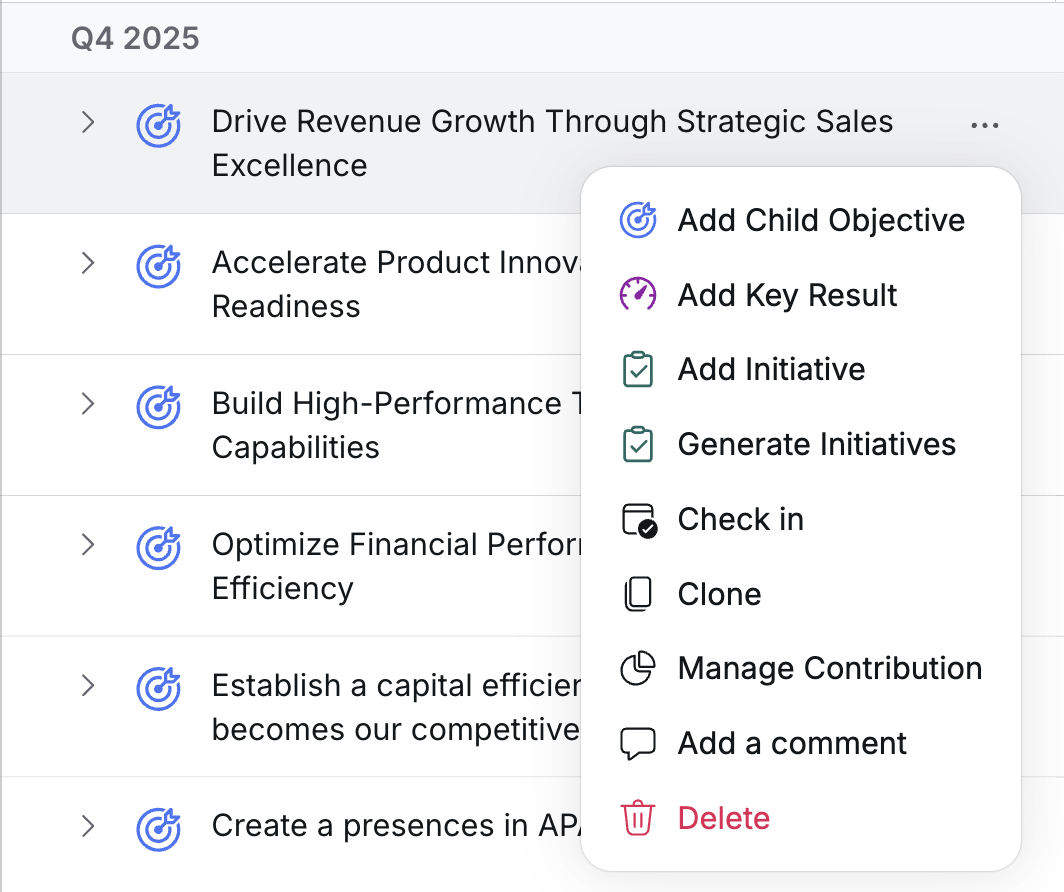
Find the Objective on your home screen
Click the three dots next to it
Select "Add Key Result"
Define the Key Result:
Enter the Key Result title
Rhythms automatically extracts metrics: As you type, Rhythms detects numbers, units, and goal types. For example, "Increase revenue from $1M to $1.5M" auto-fills currency type, starting value, and target. Review and adjust if needed. Key Results use metric-based tracking by default, see FAQ below for more on tracking methods.
Use Suggest or Improve features for AI assistance with wording
Set the metric type manually if auto-extraction didn't capture your intent (Reach a Target, Stay Above, Stay Below, Stay Within Range)
Configure starting and target values (or accept what Rhythms detected)
Set owner and time period:
Owner defaults to the Objective's owner
Time period defaults to the Objective's time period
Both can be overridden if needed
Choose next action:
Create: Publishes this Key Result
Add another: Continue adding more Key Results
Adding Initiatives
Find the Objective on your home screen
Click the three dots next to it
Select "Add Initiative"
Define the Initiative:
Enter a clear, action-oriented title
Set owner and time period (defaults to Objective's values)
Choose next action:
Create: Publishes this Initiative
Add another: Continue adding more Initiatives
Creating Child Objectives
When you need to break down a parent Objective across multiple teams:
While creating or editing an Objective, select "Add Child Objective"
Follow the same creation process
The child automatically aligns to its parent
Understanding contribution: When you create a child Objective, you can choose whether it contributes to the parent's progress calculation. By default, child Objectives don't contribute (the parent measures progress through its own Key Results). However, you can enable contribution if the child's outcomes directly determine parent success. For detailed guidance on when to enable contribution and how progress rollup works, see Understanding OKR Automatic Rollup.
Best practice: The parent Objective should have its own Key Results that directly measure success. Use contributing children only when the child's Key Results are the actual measures of parent success, not when children are simply aligned work streams.
Method 3: Document-Based Generation
When you're planning a new period and have strategy documents, Rhythms can generate complete OKR sets by analyzing your documents alongside organizational context.
When to Use This Approach
Planning new quarters or years with written strategic plans
Translating executive strategy documents into team OKRs
You have clear strategy documents but need help structuring them as OKRs
You want comprehensive OKR generation across multiple teams
The Process
Start the conversation: Click "New Objective" → "Explore with Rhythms"
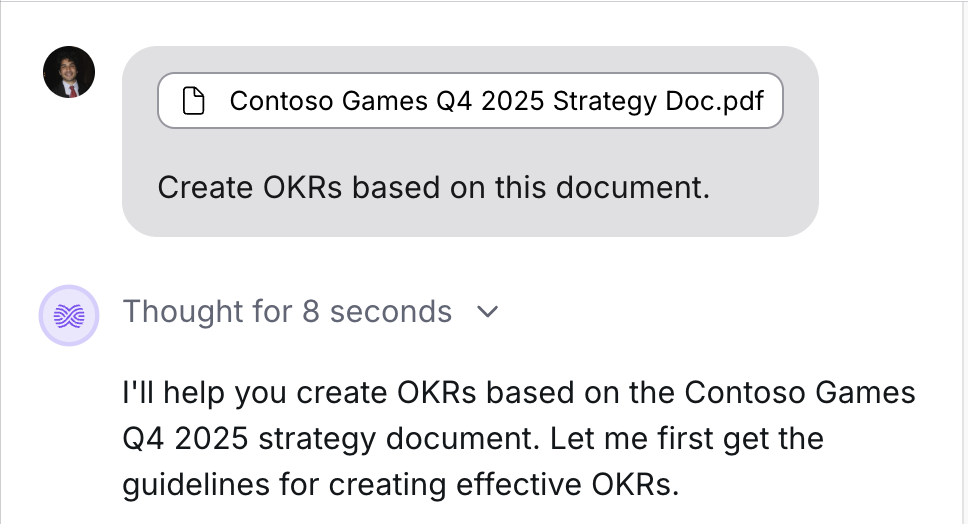
Upload your documents: Tell Rhythms you want to create OKRs from strategy documents, then upload:
Strategic plans
Vision documents
Planning memos
Board presentations
Quarterly planning documents
What Rhythms analyzes:
Key themes and priorities in your documents
Your organization's past OKR performance
Current focus areas and context
Best practices for OKR structure
Review suggested OKRs: Rhythms presents complete OKR sets (Objectives with Key Results and Initiatives) that reflect your strategic direction.
Refine through conversation: Just like conversational creation, you can iterate:
"Make this Objective more specific to B2B customers"
"Add a Key Result about employee engagement"
"The timeline should be Q2, not Q1"
Accept or reject individual Objectives: You don't have to accept everything. Pick what fits and refine or reject the rest.
Finalize details: Set owners, teams, time periods, and alignment for all accepted OKRs.
Review and publish: Drafts appear in the UI for final review before publishing.
Verification
After creating OKRs through any method, verify:
Visibility: Confirm new Objectives, Key Results, and Initiatives appear on your home screen
Alignment: Check that parent-child relationships display correctly in the hierarchy view
Ownership: Verify correct owners and teams are assigned
Metrics: Ensure Key Results have proper baseline and target values configured
To make changes after creation, see Managing and Updating OKRs in Rhythms.
Tips for Effective Creation
Be specific about context when using chat:
"For Q1 2025" not just "next quarter"
"In the Sales view" helps chat understand scope
Iterate before approving:
Chat can refine proposals multiple times
Don't feel pressured to accept first suggestions
Use natural language:
No need for formal commands or specific phrasing
Ask follow-up questions freely
Reference your current view:
"Based on what I'm looking at" works when you're in a specific team or time period view
Leverage organizational context:
Chat knows your past OKRs, team structure, and strategic priorities
It uses this to make relevant suggestions
Don't expect instant publishing:
All creation methods use draft → review → publish workflow
This gives you time for final review before OKRs go live
Start simple, add complexity:
Begin with core Objectives and Key Results
Add Initiatives and child Objectives as you refine
Frequently Asked Questions
Should I use chat or forms to create OKRs?
Chat is the best option in most scenarios because it helps you think through strategy, suggests improvements, and refines ideas through conversation. Use forms when you have OKRs fully defined and just need to enter them quickly, or when you prefer direct control over every field.
What's the difference between progress-based and metric-based tracking?
Rhythms offers two ways to track progress:
Progress-based tracking (0-100%): Track overall completion as a percentage. Used by default for Objectives and Initiatives. Progress updates manually during check-ins, or automatically for parent Objectives based on child Key Results (when using automatic rollup).
Metric-based tracking (specific numbers): Track actual values and let Rhythms calculate progress. Used by default for Key Results. Progress updates by entering current values during check-ins or automatically through auto-updates from connected tools.
You can switch between methods anytime on the OKR detail page by clicking "Change to metric-based" or "Change to progress-based."
Learn more about metric types in Understanding Metric Types in Rhythms and how parent progress calculates in Understanding OKR Automatic Rollup.
Can I mix creation approaches?
Yes. You might use chat to create the initial structure, then use forms to add specific Key Results or Initiatives later. Or start with document generation, then use chat to refine individual Objectives.
What if AI suggestions don't fit my needs?
Keep iterating in chat with more specific requests, or reject suggestions and write your own. The AI provides a starting point, not a requirement. You maintain full control.
What documents work best for AI generation?
Strategy documents, quarterly plans, vision statements, and planning memos work well. The more specific your documents are about priorities and outcomes (not just activities), the better the AI suggestions.
Can I edit OKRs after creation?
Yes. See for guidance on editing owners, teams, time periods, alignment, and other attributes.
How do I know if my OKRs are good?
Apply the frameworks from Introduction to OKRs:
Objectives: Significant, Concrete, Action-Oriented, Inspirational
Key Results: Specific, Measurable, Verifiable, Ambitious Yet Achievable
Initiatives: Resourced, Focused, Trackable, Clear
Use the Necessary and Sufficient test for Key Results
What happens to drafts I don't publish?
Drafts exist only for your review and aren't searchable in Rhythms. If you don't publish them, they won't be visible to your organization. You can return to them later through the UI to publish or discard.
Can I create OKRs for multiple teams at once?
With document-based generation or chat, you can create comprehensive OKR sets across teams in one session. Each Objective gets assigned to its appropriate team during the creation process.
Related Articles
Understanding the framework: See Introduction to OKRs for best practices on Objectives, Key Results, and Initiatives.
Setting up metrics: See Understanding Metric Types in Rhythms for detailed guidance on Key Result metrics.
Understanding rollup: See OKR Parent-Child Rollup for how parent progress automatically calculates from contributing children and when to use this feature.
Making changes: See Managing and Updating OKRs in Rhythms for guidance on editing OKRs after creation.
Tracking progress: See Effective Check-Ins to Track OKR Progress in Rhythms for how to update progress.