How to work on documents from Slack
Last updated: August 24, 2026
A doc gets shared in a channel, someone has a question about it, and then the thread and the doc drift apart. The comment lives in Slack, the context lives in the doc, and nobody's sure which one is current.
The short answer
Bring a doc into the thread and work it from there
@Rhythms comment on the doc: this needs a launch date
Comment, reply, resolve, or ask Rhythms to read it for you. Nothing changes in the doc until you say so.
Before you start
Rhythms in your Slack. Set up Rhythms in Slack →
Access to the doc. Rhythms can only work with documents it has access to — the same sharing and permissions that apply in the product apply here. It can't see docs that haven't been shared with it.
Step 1: Bring the doc into the thread
If it's already shared in the channel
Reference it the way you'd point a teammate to it.
Try it: @Rhythms summarize the doc above and pull out the open questions
Also works: "what's the state of the doc Dana posted?" · "give me the short version of this one" · "what's still unanswered in here?"
If you want Rhythms to find it
Ask, and it looks across your Library.
Try it: @Rhythms find the working doc for the partner directory
Also works: "pull up the partner directory doc" · "which doc has the launch plan in it?"
Tip: Name the doc you mean when a channel has several in play.
"The doc above" is enough in a quiet thread, but in a busy one it's the difference between Rhythms working the right document and asking you which one.
Long docs are fine. Rhythms reads the whole thing, and it can point you at a specific section rather than summarizing all of it if you ask for that instead.
If you have comment notifications enabled on Slack
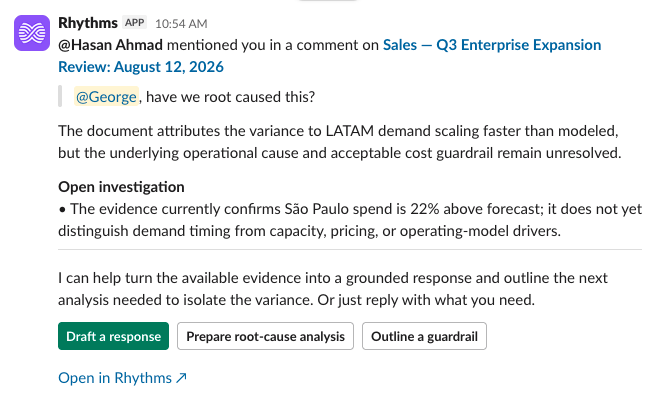
Reply to the notification with your updates. Rhythms updates the comment without you having to leave Slack.
Step 2: Comment, reply, and resolve without leaving the thread
Once the doc is in the conversation, work it the way you'd work a comment thread.
Try it: @Rhythms comment on the doc: this needs a launch date before we can scope it
Reply to an existing comment, or resolve one once it's settled.
Try it: @Rhythms reply to Dana's comment: confirmed, shipping after the test
Also works: "resolve the comment about the launch date" · "resolve Dana's comment" · "who has open comments on this doc?"
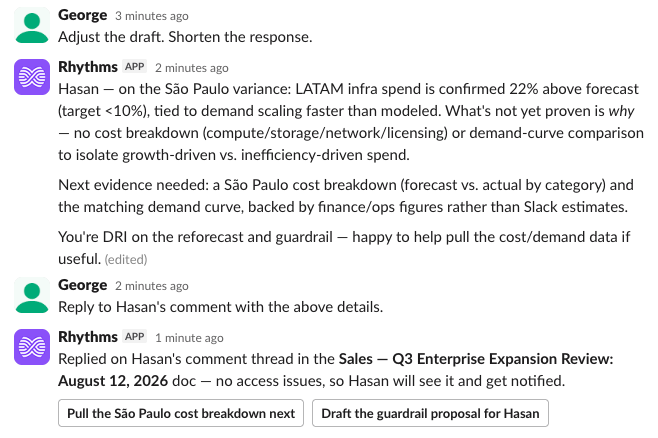
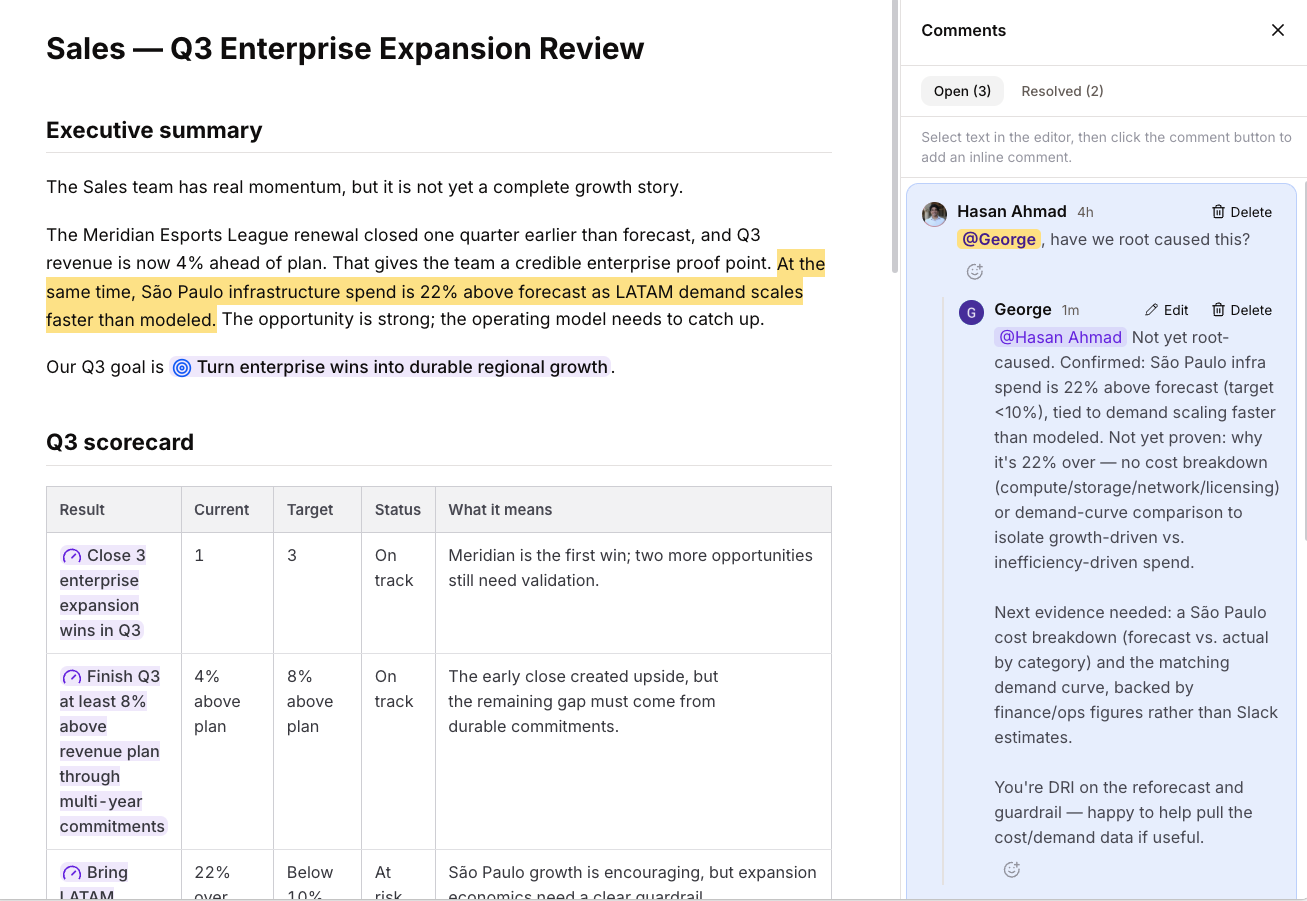
Every comment posts to the doc itself, so anyone opening it later sees the same conversation you had in Slack. Comments, replies, and resolutions all sync. Nothing is Slack-only — which is the whole point.
Step 3: Optional · Ask questions, or hand off the next step
Once Rhythms has read the doc, keep going in the same thread.
Try it: @Rhythms what did we decide about the launch date?
Also works: "who raised the concern about scope?" · "what did we say about pricing in here?"
Useful when a doc has sat untouched for a while and you need the state of it before a meeting, without opening it yourself.
Try it: @Rhythms what's changed in this doc since last week?
When the answer is more work rather than an answer, hand that over in the same breath.
Try it: @Rhythms turn the open questions into a follow-up doc and share it with Sam
Also works: "draft a summary I can post in #leadership" · "share this with the pricing group"
Sharing from Slack grants access the same way sharing from the product would — it's the same permission change, not a copy.
If something didn't work
Rhythms says it can't find the doc
It hasn't been shared with Rhythms, or you're describing it differently than it's titled. Try the exact name, or share it and ask again.
It worked on the wrong doc
A busy channel with several docs in play. Name the doc explicitly rather than saying "the doc above."
My comment isn't showing in the document
Check it actually saved rather than sitting as an unconfirmed draft in the thread.
Someone can't open the doc I shared from Slack
Sharing follows product permissions. If they couldn't open it there, the Slack share doesn't change that — grant them access explicitly.