How to check in on your goals from Slack
Last updated: August 24, 2026
Check-ins are the thing everyone means to do and nobody remembers. The fix isn't discipline — it's doing them where you already are, in the words you'd use anyway.
The short answer
In any channel Rhythms is in, post @Rhythms check in on my goals and reply the way you'd tell a teammate what happened.
Rhythms converts it into a check-in on the right goal and shows you the draft. Nothing saves until you confirm.
Before you start
Setup Rhythms in Slack: Getting Started with Rhythms in Slack →
Have at least one published goal
Start a check-in rhythm, if you want to be prompted rather than remember
Step 1: Tell it what's true
If you know which goal
Name it, and say what happened.
Try it: @Rhythms check in on my goals
Also works: "update my Q3 revenue goal, we closed the two enterprise deals" · "mark the onboarding project 80% done" · "we're behind on activation, put it at risk"
If you'd rather it prompt you
Ask what's due, and it comes back with the list.
Try it: @Rhythms what check-ins are due this week?
Also works: "what haven't I updated in a while?" · "which of my goals are overdue for a check-in?"
Tip: Connect the tools behind your goals
Rhythms can then suggest the check-in from what actually changed, instead of asking you to remember it. [Connect your tools →]
If you have check-in notifications enabled on Slack
Reply to the notification with your check-in updates. Rhythms updates it without you having to leave Slack.
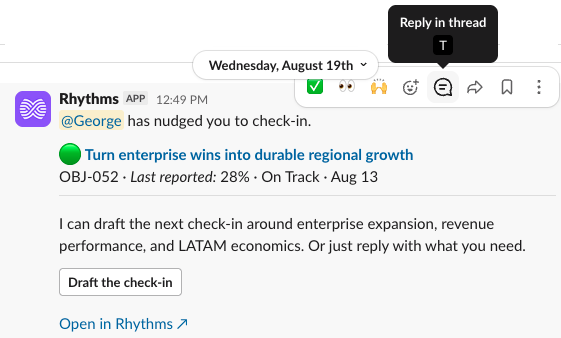
Step 2 : Optional · Turn a conversation into a check-in
A lot of progress gets talked through in a channel before anyone logs it: a thread about how the migration's going, a quick "where are we on renewals" back-and-forth. Tag Rhythms once that conversation exists and it turns the discussion itself into check-in drafts.
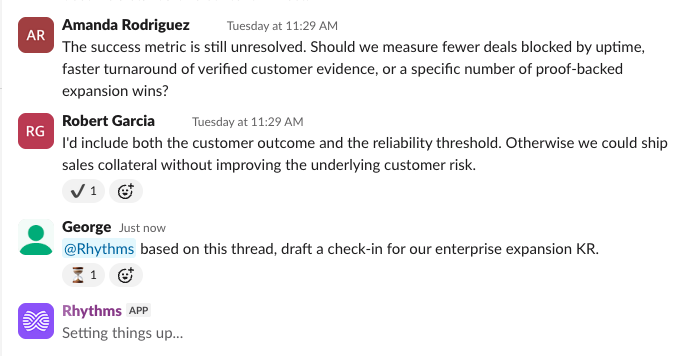
Try it: @Rhythms turn this conversation into check-ins
Also works: "did we cover anything check-in worthy in here?" · "log what we just decided against the right goals"
It only pulls from what was actually said. If the thread doesn't clearly cover a goal, it leaves that one out rather than guessing.
This also handles several goals at once — either ask directly, or let one conversation that touched four goals become four drafts you approve together.
Step 3: Review the draft, then confirm
Rhythms shows you what it's about to log against the goal, and where the number or status is coming from.
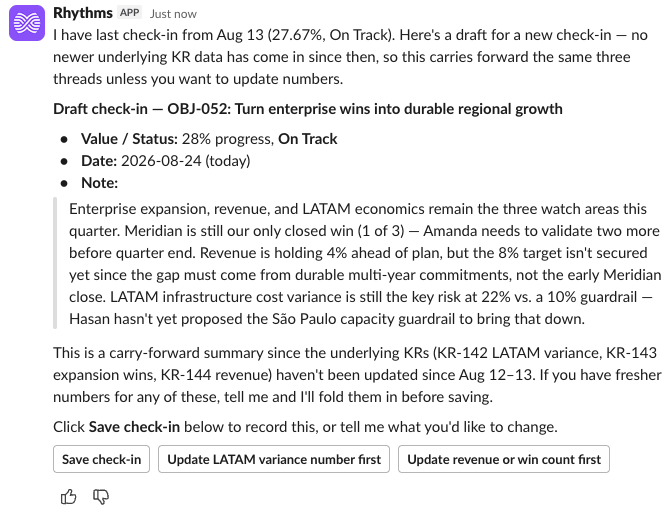
Every check-in is a draft until you confirm it. Reply in the thread to correct anything before it saves — that's faster than starting over.
Try it: @Rhythms make it 65% and note the API delay
Also works: "actually mark it at risk" · "change the note to mention the vendor delay" · "wrong goal — I meant the activation one"
Disagreeing with a suggested status is normal and cheap. Say so in the thread and it updates the same draft rather than making you begin again.
Where the draft comes from: what you said in the thread, plus any tools you've connected. When it isn't sure, it asks rather than guesses.
Make it a habit
Get asked, instead of remembering. Once your check-in rhythm is set, Rhythms can prompt you in the channel or in a DM when one is due.
Try it: @Rhythms remind me when my goals are due for a check-in
Ask before you update. Not sure what's changed since last time?
Try it: @Rhythms what's changed on my goals since my last check-in?
Also works: "what did I say last time on this goal?" · "has anything moved on my goals this week?"
Worth knowing
This is the same check-in as the web app. Not a Slack-only shadow copy. Anything logged here shows up on the goal in the product, and vice versa.
In a DM you don't need to tag it. Just talk to it. The @Rhythms prefix is only for channels and threads.
If something didn't work
It picked the wrong goal
Say so in the thread — "wrong goal, I meant the activation one." It'll redraft against the right one. Naming the goal explicitly in your first message avoids this when you own several similar ones.
It says it can't find a goal to check in on
Either you have no published goals, or the ones you have are still drafts. Drafts are invisible to check-ins.
It won't accept a number
That goal has no metric — check in with a status and a note instead, or add a metric to the goal.
Nothing happened when I tagged it
Rhythms isn't in that channel. Add it, or check in from a DM.
Try Next
Manage goals from Slack → When the goal itself needs to change, not just its status